SignUpGenius Logo
SignUpGenius Logo
Products
Pricing
More
Create

Products

  • Sign Ups
  • Payments
  • Events
  • Fundraisers
  • Dues & Fees
  • Peer-to-Peer Fundraisers
  • Forms & Waivers
  • Online Stores
  • Group Gifts

About

  • Pricing
  • About Us
  • Social Impact
  • Press Kit
  • Press Releases
  • Resources & Tips
  • Blog
  • Case Studies
  • Video

Support

  • Help Center
  • API Docs
  • Contact Us
  • Careers
  • Product Updates

My Account

  • Dashboard
  • Templates
SignUpGenius

©2026 SignUpGenius Inc. All Rights Reserved.

Privacy PolicyTerms of Service  
  1. Support
  2. Managing
  3. Hide Names on Sign Ups

Hide Names on Sign Ups

We offer the option to hide the names and comments associated with your sign up. While creating or editing your sign up, go to the Settings tab. Select the gear icon where you see the text:

Note: Only name and comment are seen by participants.

You will then see the option to Hide names and comments from participant view. Check this option then click the green button at the bottom of the page to save changes.

As the sign up creator, if you are logged in to the site, you will be able to see the names and comments of those who signed up because the system recognizes you as the creator.

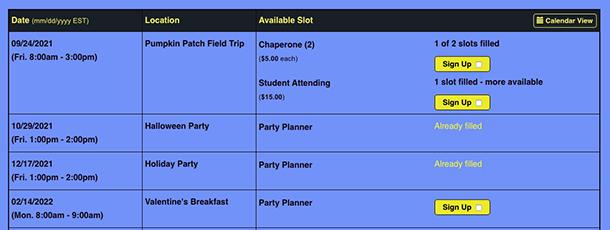
When participants view the sign up, they will see "Already Filled" if a slot is full, or they will see the number of filled slots of the total slots available.
If you are working with an RSVP format sign up, we offer an additional setting to hide participant responses. On the Slots tab, simply uncheck the option Allow everyone to see RSVP attendees and click the green button at the bottom of the page to save changes.

View Additional Resources

Posted by SignUpGenius

Related FAQs

  • Delete Account
  • Create Reports and Export Sign Up Data
  • Send Messages to Group Members
  • View Sent Messages
  • View Emails of Group Members
  • Locate Participant's Phone Number or Custom Question Response
  • Add an Item to Your Personal Calendar
  • Edit Sign Up Slot Quantity
  • Change Date on a Sign Up Page
  • Close or Lock a Sign Up
  • Edit a Participant's Sign Up Slot
  • Manage Paused Messages
  • Locate Sign Ups in Account
  • Add a Sign Up Administrator
  • Delete a Participant from a Slot
  • Add People to a Sign Up