Manage Calendar Subscriptions
Paid subscribers and sub-admins assigned to the account can create a calendar feed with one or more sign ups and then sync the calendar feed to their personal digital calendar.
- Log in to your account and click the Tools icon on the left side of your account Sign Ups page.
- Select the Calendar Subscriptions icon.
- Select Create iCal Feed.
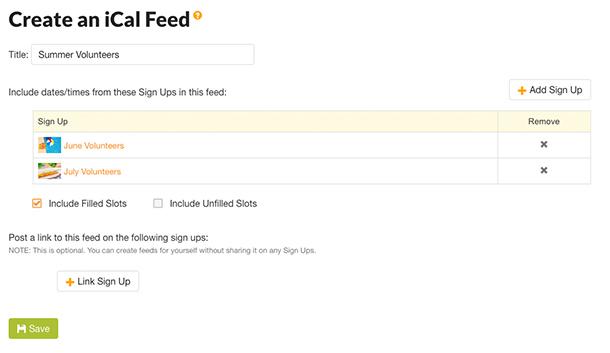
- Enter the name for your calendar in the Calendar Title field.
- Click Add Sign Up to view a list of available sign ups. You can select up to five sign ups from your account.
- Click the Add button at the bottom of the pop-up screen.
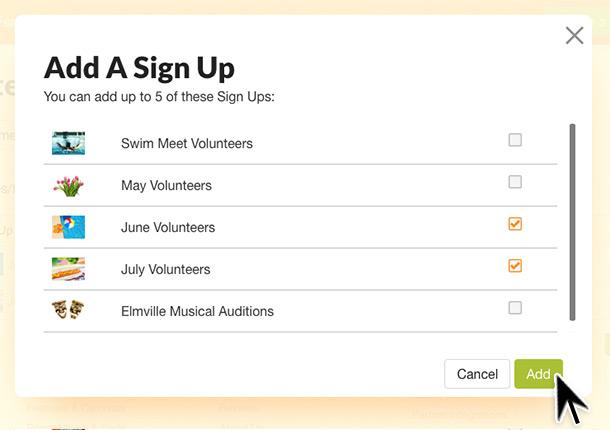
The next screen will allow you to select whether the calendar will include filled slots, unfilled slots or both to your calendar.
If you would like to make the calendar feed available for sign up participants, you can click Link Sign Up. Only choose this option if you want participants to be able to sync all items on the sign up(s) to their personal digital calendars.
Click Save at the bottom of the page.
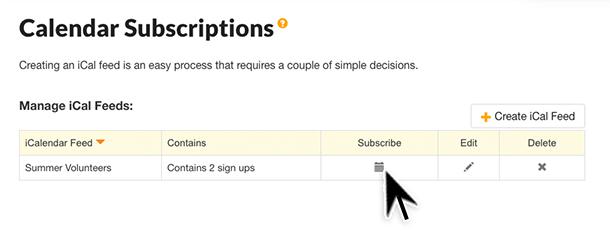
The next screen will provide the details of the calendar you have created.
- Select the calendar icon underneath the Subscribe text.
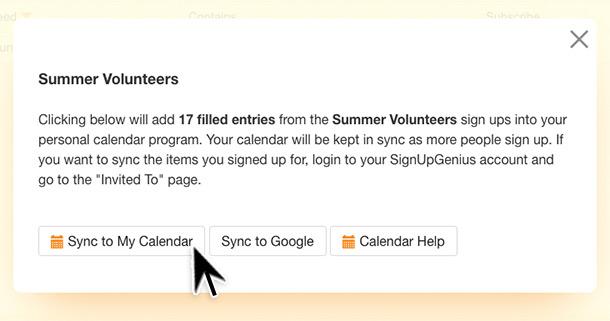
- Choose Sync to my Calendar to sync all items.
- Choose the Calendar Help button to show details about syncing to specific calendars such as Google and Outlook or to see the webcal link.
Posted by SignUpGenius