Manage Account Profile and Settings
Need a new identity? OK, OK, maybe you just want fewer emails. We can help you manage your account profile and preferences in our Settings area.
First, log in to your SignUpGenius account by entering your email address and password. Once logged in, locate the circle with your initials or profile picture in the upper right-hand corner.
Click the circle and select Settings.
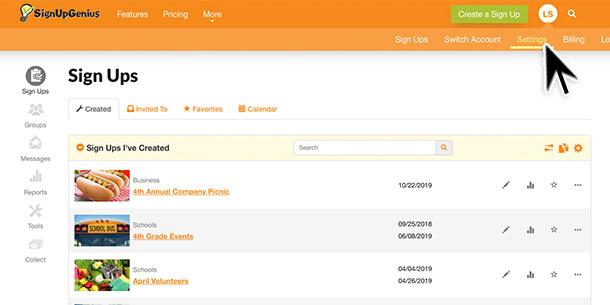
You will notice six tabs at the top highlighting different settings for your account.
The Profile tab allows you to:
- Edit your name, email address and other contact information
- Choose a profile picture for your account
- Merge your account with another SignUpGenius account
The Password tab allows you to:
- Reset the password for your account
The Notifications tab allows you to:
- Manage the groups you are associated with
- View the groups you can receive text messages from
- Manage newsletter subscriptions
- Set reminder preferences for email or texts and set preferred notification times
- Block email addresses of any sign up creators you wish to not contact you
The Sign Ups tab allows you to:
- Choose default settings for the sign ups you create
- Lock these settings across all existing and new sign ups in your account
The Integrations tab allows you to:
- Manage integrations with our partners Fundly and Zoom
The Date & Time tab allows you to:
- Set the preferred date format
- Manage time zone setting for your account
If you make changes to any of these areas, be sure to click Save to update your preferences. Voila! And you didn't even have to go into witness protection.